How to integrate Mixpanel the right way: best practices and common pitfalls
After implementing Mixpanel with 80+ clients across LatAm, we put together the lessons that matter: planning, ingestion architecture, user identification, and the server-side tracking most teams get wrong.
This guide is a companion to Mixpanel's official documentation —please read it too (link). Here we share what we learned after implementing Mixpanel with 80+ clients across LatAm: how to orient yourself, which decisions prevent expensive mistakes, and where most teams get stuck.
Planning before implementation
The most common mistake we see: engineering jumps straight into integrating and tracking events without going through a planning phase. Skipping that step always costs you —you end up with inconsistent tracking plans, metrics that don't answer the business questions, and months of rework.
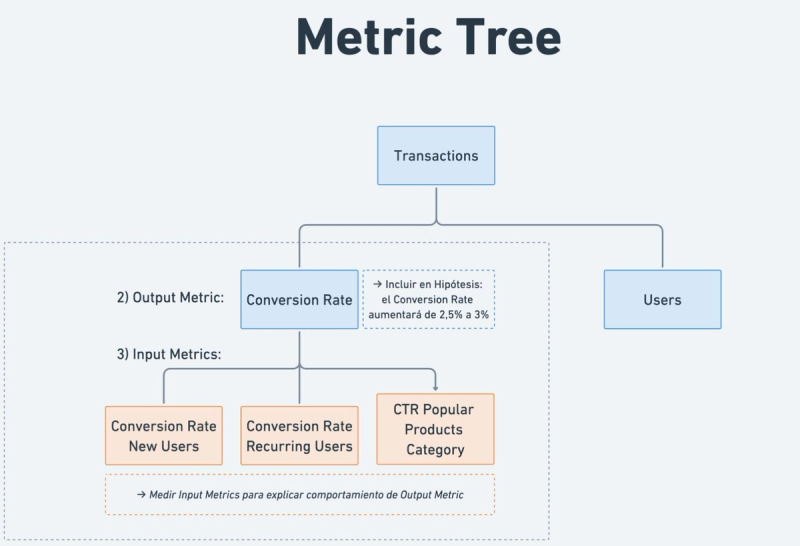
In the planning phase, we define —in this order:
— Which business questions and use cases we want to solve with Mixpanel.
— Based on those questions, which metrics we need to be able to build to answer them.
— Based on those metrics, which events, event properties, and user properties we need to track.
All of this gets documented in a Tracking Plan, which engineering then uses as the source of truth to implement each event. We wrote a detailed guide with frameworks and lessons for this stage —we recommend following it.
Events and event properties
Events
An event is an interaction between the user and your product that you decide to track. Every event has a name, a timestamp, and is tied to a user.
For example, to track when a user buys a coffee in your app, your developers need to add this line where the action runs:
mixpanel.track('Purchased Item');
This snippet is in JavaScript; the event can be tracked in different languages depending on what your team uses.
Event properties
Events can optionally carry properties that describe the user's action in more depth. For example, if the coffee cost $2.50 USD:
mixpanel.track('Purchased Item', {
'item name': 'coffee',
'price': 2.50,
'currency': 'usd'
});
Data ingestion architecture
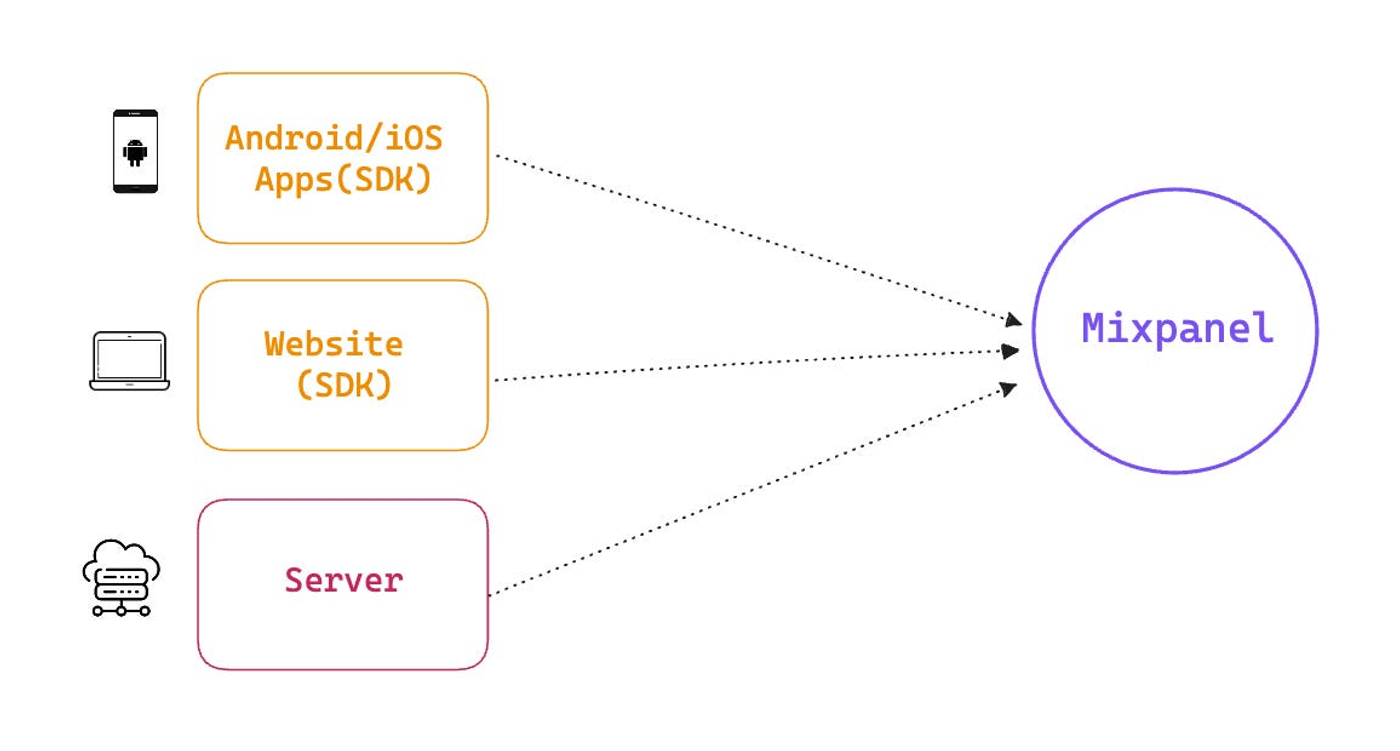
There are several ways to send events to Mixpanel, and it's normal to combine multiple methods. Which one you pick depends on your use cases and the tech your team has available.
The most common setup
Client-side tracking:
— Apps: we track user events in native apps (Android, iOS, React Native, Flutter).
— Website: we track events and page views on the site (JavaScript).
Server-side tracking:
— Backend: we send events from our servers (Node, Python, etc.). This is typically transactional data (Purchase, Transaction) or account creation (User Sign Up).
More advanced setups
CDP: if your event data already lives in a Customer Data Platform (Segment, Rudderstack), you can connect Mixpanel directly. If that's your case, this guide doesn't apply.
Third-party tools: you can connect Mixpanel with marketing tools (OneSignal, Braze), CRMs (Salesforce, HubSpot), or A/B testing tools (VWO, Optimizely) to import campaign, customer, or experiment data.
Data Warehouse: you can connect and sync Mixpanel with your warehouse (BigQuery, Snowflake, Azure). For example, if your backend events already live in BigQuery, you can sync Mixpanel with a table in real time. You can also enrich with non-event data —marketing ad data, CRM data, etc. (docs).
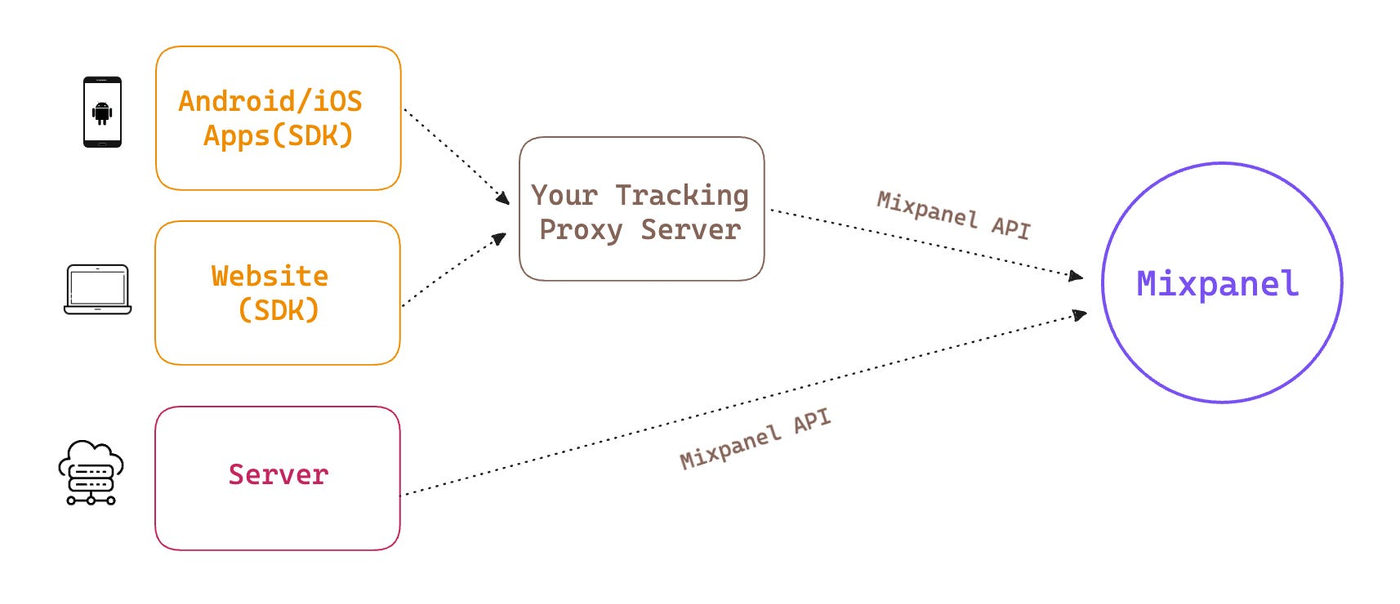
Client-side proxy: you can add a proxy server between your frontend and Mixpanel to gain control over client events. We go into this at the end.
User identification (where most implementations break)
Pay maximum attention here. This is where the majority of Mixpanel implementations fall apart.
Mixpanel has two key concepts: events and users. And there are several use cases you want to handle correctly from day one:
— A user can use your product anonymously before creating an account.
— Then they sign up.
— They can log in from multiple devices (phone, personal laptop, work laptop).
— They can fire events from different sources (client side, server side, marketing platform).
— Multiple users can log in on the same device.
How Mixpanel identifies users
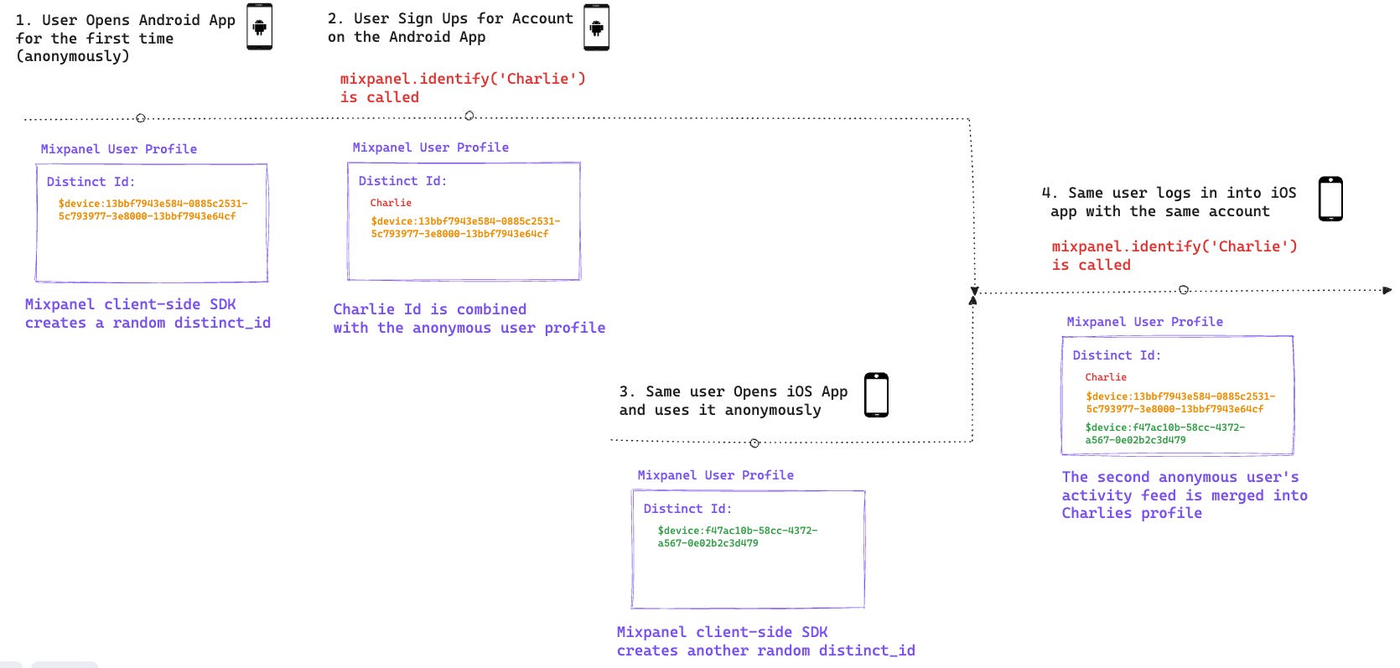
When a user opens your website or app for the first time (client side), Mixpanel assigns them a random ID with the format $device:13bbf7943e584-0885c2531-5c793977-3e8000-13bbf7943e64cf and stores it under the $distinct_id field. This $distinct_id is persisted in the client's local storage (cookies on web, local storage on mobile).
When that user fires an event (say 'Add to Cart'), Mixpanel looks up the $distinct_id from local storage and ties the event to that ID. For now, the anonymous user's ID.
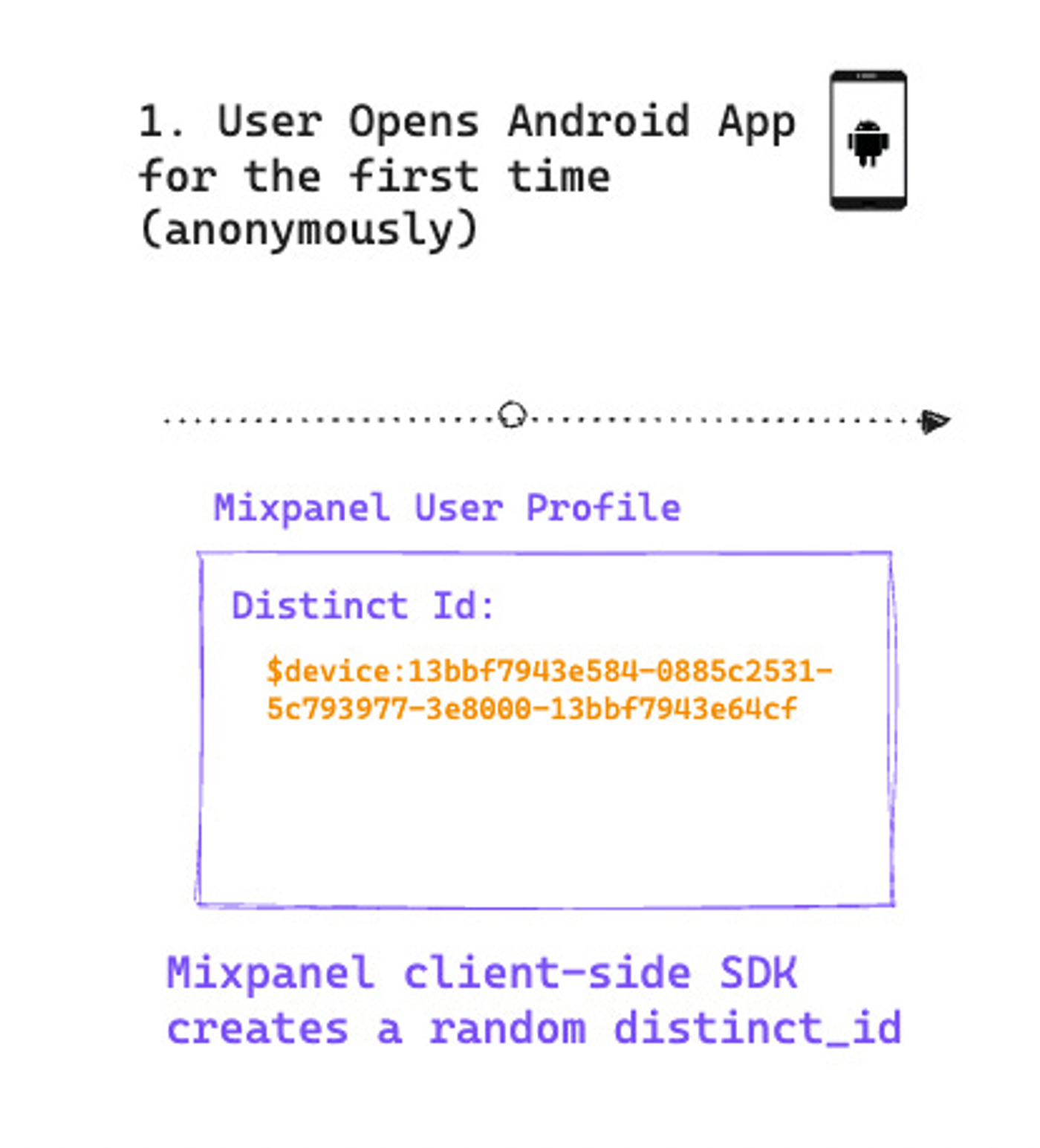
Never force or send a $user_id on client-side events. The SDK handles this natively.
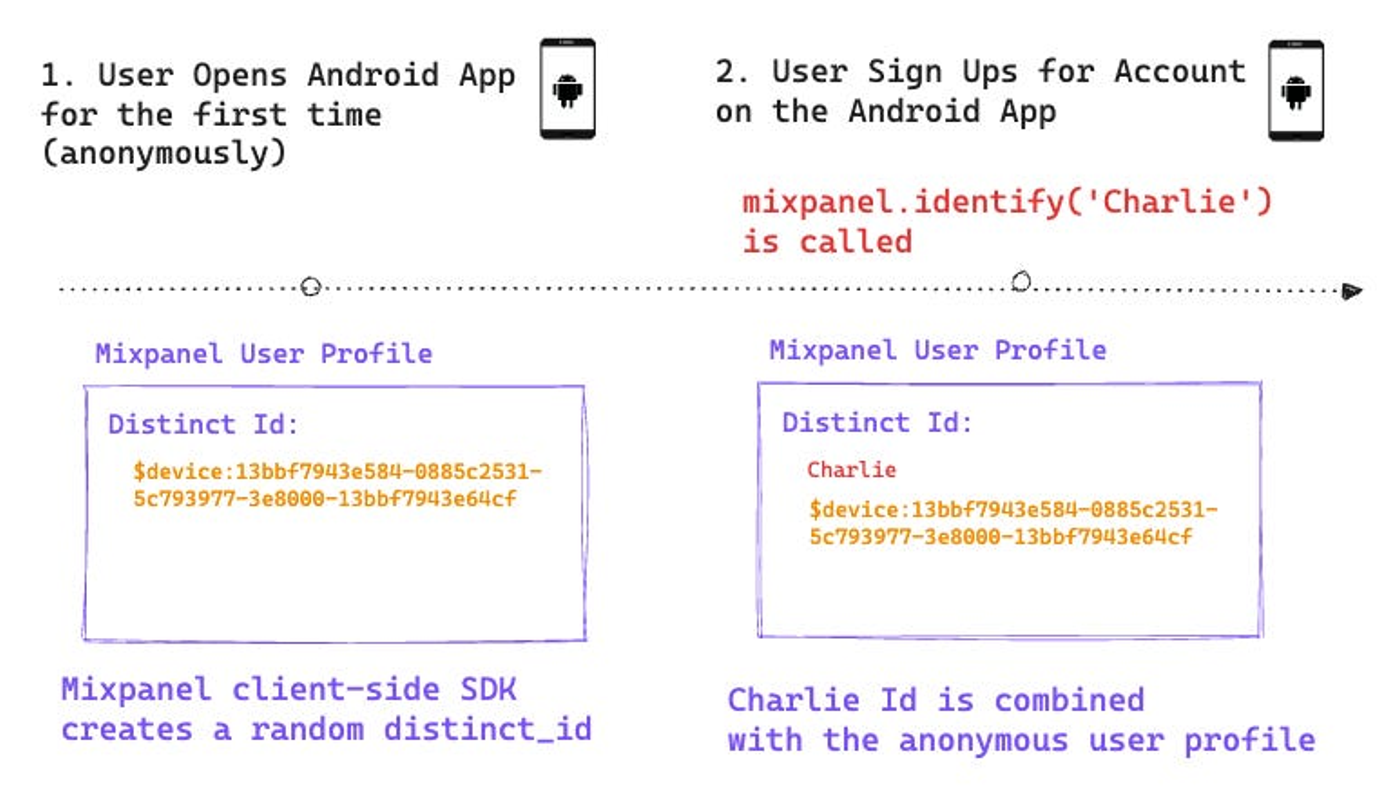
When the user signs up or logs in, your client-side developers need to call identify with the user_id they use internally:
mixpanel.identify('<user_id>')
Best practice: use an identifier that doesn't change over time and is unique per user. Most teams already have one —the primary key they use to identify users in their database.
When the identify call fires, Mixpanel merges the anonymous user's activity with the identified one under a single profile. If you're on Simplified ID Management, this new user_id becomes the canonical one.
What if the user has multiple devices?
Say the same user opens the app from another device and browses anonymously. The client-side SDK creates a new random $distinct_id ($device:xxx-yyy...), and any anonymous events get tied to that ID.
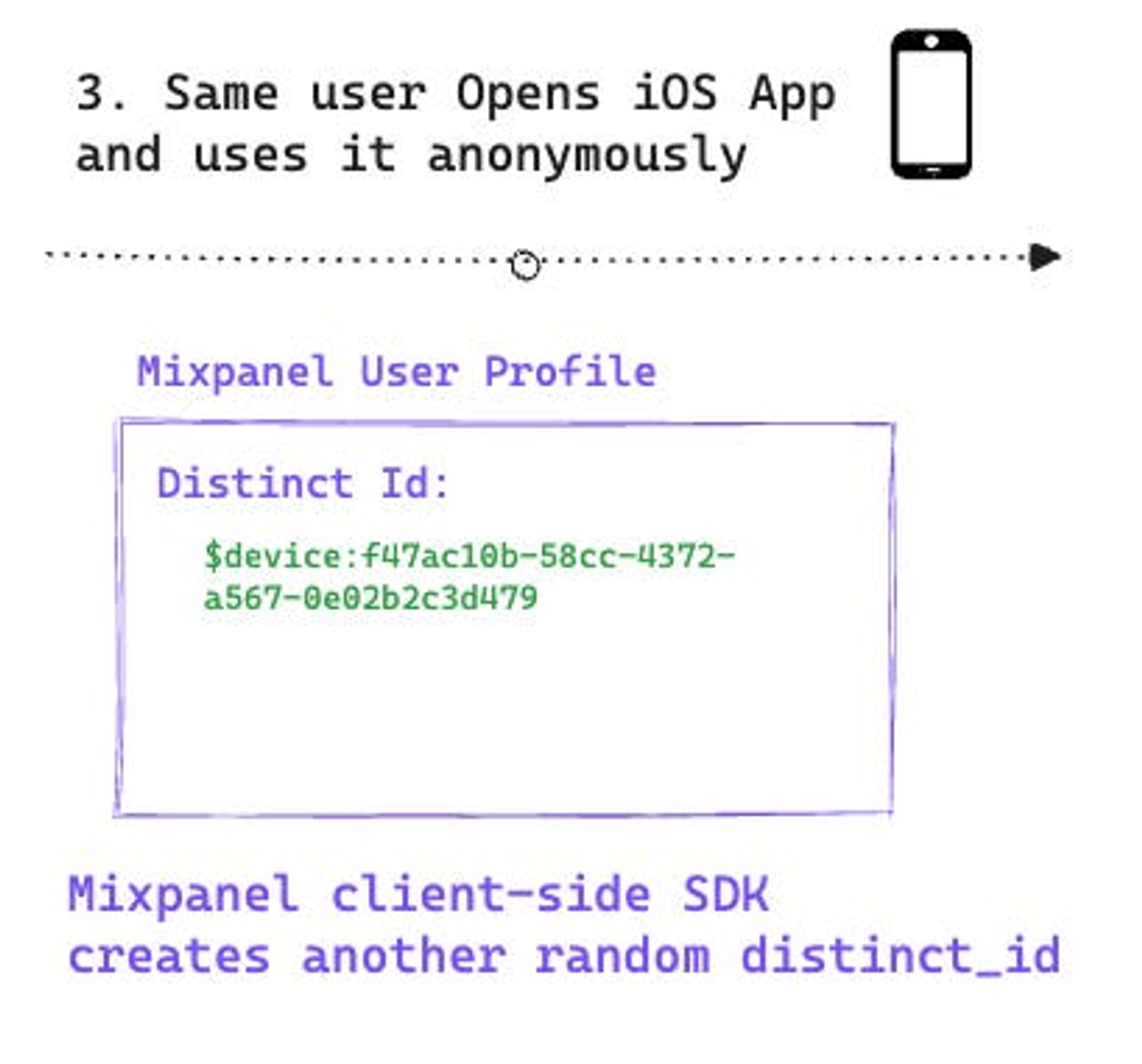
When the user logs in on this second device with the same user_id, the identify call merges the events from both anonymous profiles under the same user profile.
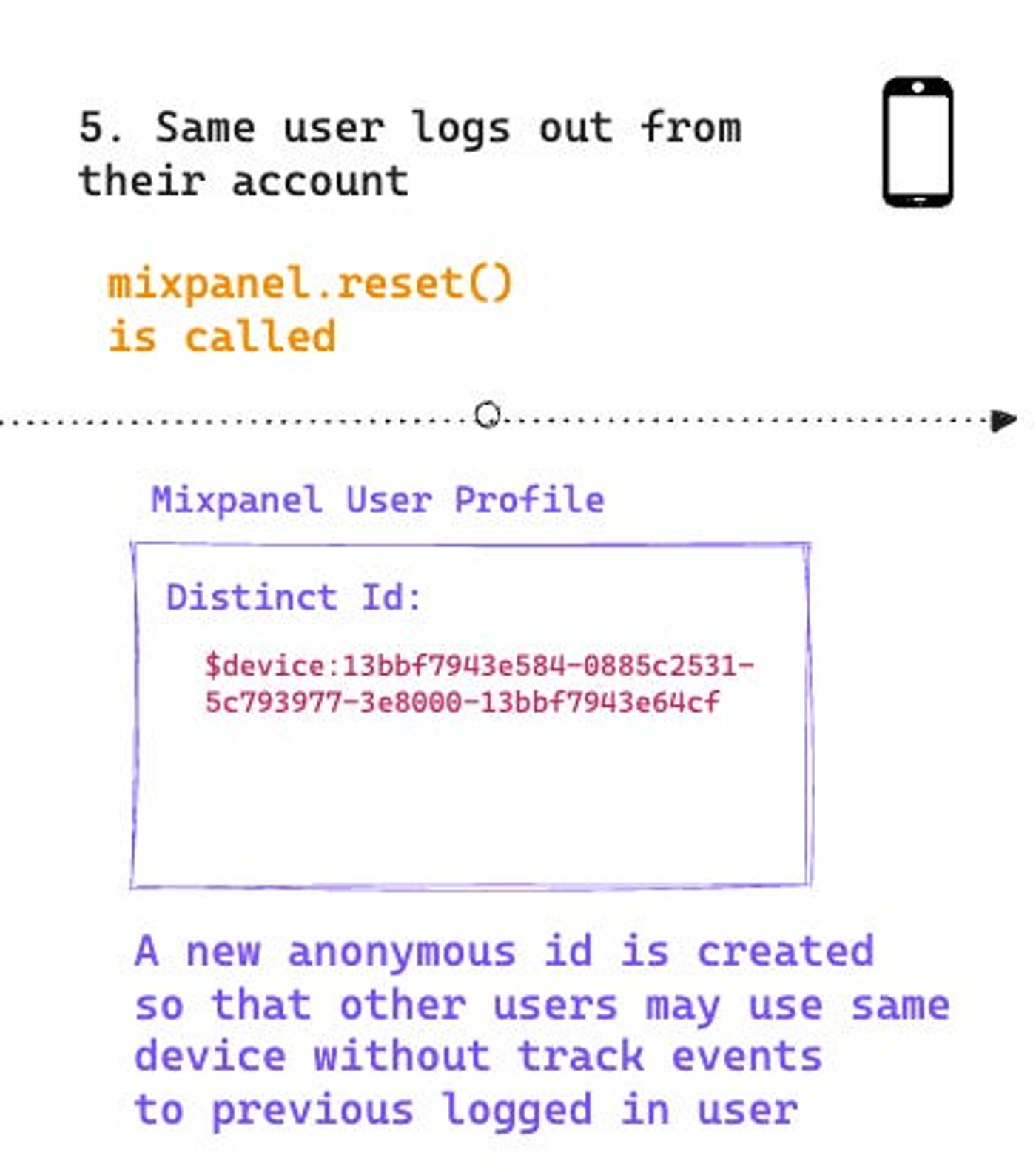
What if the same device is shared by multiple users?
To prevent the next user logging in on the same device from inheriting the previous user's anonymous activity, you have to call reset on log-out:
mixpanel.reset()
This makes the client-side create a fresh $distinct_id for the next anonymous user. When that next user signs up or logs in, their events get correctly tied to their own profile.
Key user-identification tip
Every time you call identify, also send the $user_id as a user property. This will save you hours of QA and debugging down the line.
Mixpanel client-side docs: JavaScript, React Native, Android, iOS.
Server-side events
Rule of thumb: if an event can be tracked from the server, track it from the server.
Client-side events are less reliable than server-side ones. A few common issues:
— On web, ad blockers can prevent Mixpanel from writing to cookies, and those events never get tracked.
— On web and mobile, connection issues can cause users to click a button multiple times and fire the same event repeatedly.
Transactional events (Purchase) and account creation (Sign Up) usually run on the backend. Sit down with that team, identify which events are theirs, and document in the Tracking Plan that they own the tracking.
How do I track a server-side event?
You need to specify who fired the event using $user_id:
mixpanel.track('Purchase', {
$user_id: 'Charlie',
price: 2.50
});
In 99.99% of cases, server-side events are sent for users who were already identified from the client side.
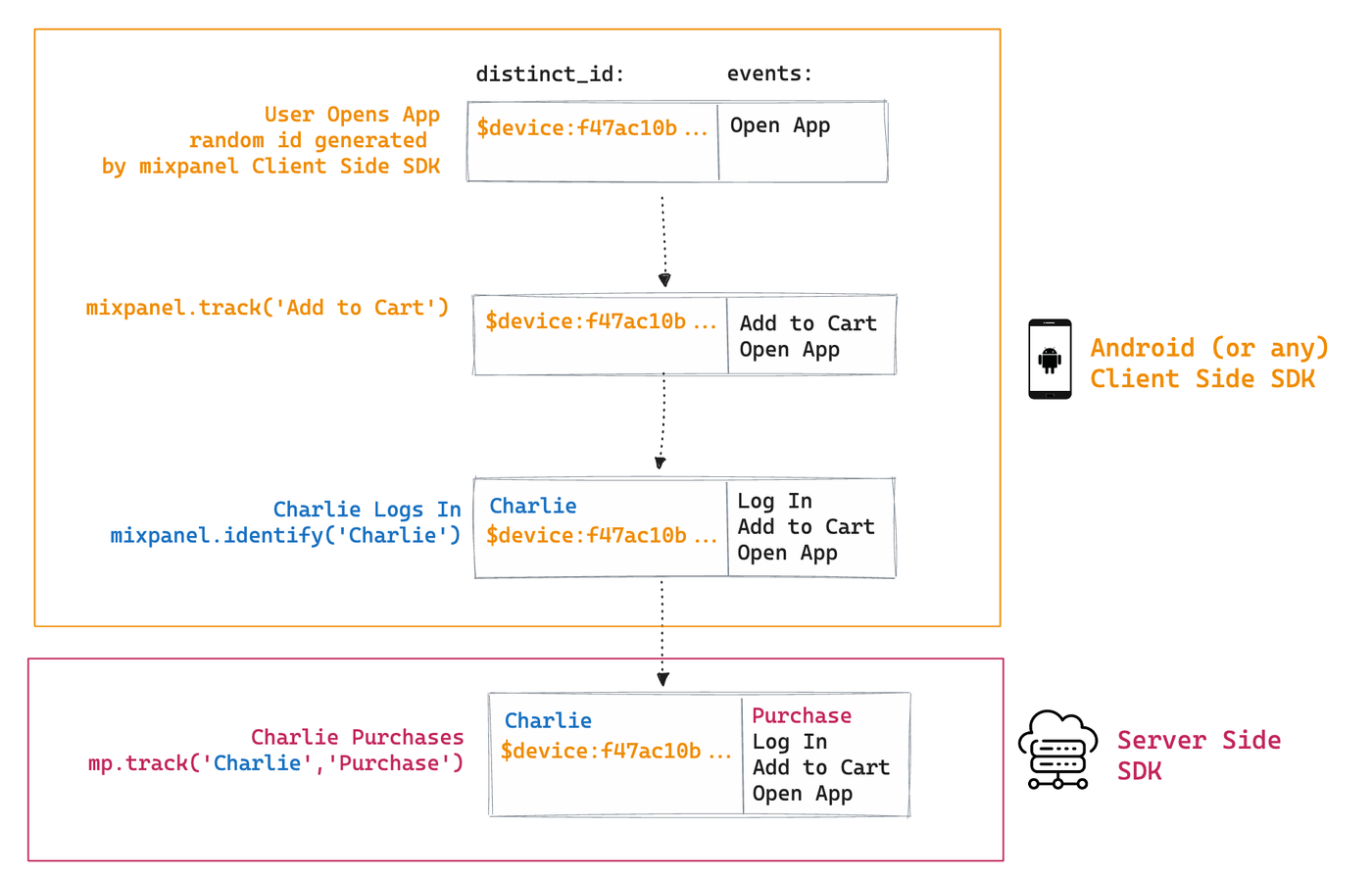
The normal end-to-end flow
1. The user opens the app or website.
2. The client-side SDK creates an anonymous user with $device:xxx.
3. Any event fired before identifying is tied to that anonymous profile.
4. The user signs up. Client-side calls mixpanel.identify('<user_id>') and also sends the user_id as a user property with mixpanel.people.set({ 'User ID': '<user_id>' }).
5. Mixpanel merges the anonymous profile with the identified one and stores $distinct_id in local storage.
6. The user fires a client-side event (say 'Add to Cart'). Client-side calls mixpanel.track('Add to Cart'); Mixpanel grabs the $distinct_id from local storage and records the event.
7. The user completes a purchase. Server-side records the event with the explicit $user_id:
mixpanel.track('Purchase', {
$user_id: '<user_id>',
price: <price>
});
Mixpanel stores this event in the same user profile that already holds the client-side events.
Edge cases to watch for
What happens if I track a server-side event before the user has been identified on the client? Mixpanel creates a new profile with the $distinct_id from the server-side event. That duplicates profiles (one anonymous + one identified). When the client-side identify call eventually fires, the profiles get merged. Review this scenario —it's rarely the expected behavior.
What if I send a server-side event with no user assigned? It gets attached to a profile with $user_id null. Usually an implementation bug. There are a few valid cases —importing Ad Spend, for example, isn't tied to a specific user.
Can I track server-side events for anonymous users? We don't recommend it, and in 50+ implementations we've never had a use case that justified it. If you must, you can use get_distinct_id on the client to grab the anonymous user's $distinct_id and send it as $device_id in the server-side event (stripping the 'device:' prefix). But first, double-check you actually need this.
Mixpanel server-side docs: Python, Node.js, Ruby.
Proxy server: can we fix client-side reliability?
Yes. By implementing a proxy server between your client-side tracks and Mixpanel. The idea: your frontend sends events to your own server, and your server forwards them to Mixpanel.
Things to keep in mind:
Since you're not using the native client-side SDK, you'll need to replicate its logic and do a more careful QA. Three things in particular the native SDK handles automatically that you'll need to replicate:
— IP: Mixpanel uses the IP to enrich geolocation (country, city, region). You'll probably need to capture it on the frontend and forward it. Docs.
— UTM Tags: the native SDK appends UTMs to every event. You'll need to capture and forward them yourself. Docs.
— Mixpanel metadata: the SDK picks up native client-side properties (browser, device, OS, etc.). Make sure you capture them and forward them through the proxy.
Wrapping up
If you made it this far, you have most of what you need to keep your Mixpanel implementation from breaking in the first three months. Planning, user identification, and the client-vs-server decision are the three places we see teams break most often —and all of them are avoidable.
If you want us to review your implementation or help with a migration, reach out.